


Are you struggling to make sense of your customer data? Imagine turning all those scattered details into clear insights that drive smarter decisions and boost your sales.
That’s exactly what CRM Data Analytics can do for you. By analyzing your customer information, you unlock powerful opportunities to understand buying behaviors, predict trends, and tailor your marketing efforts with precision. If you want to stop guessing and start knowing, mastering CRM Data Analytics is your key. To make this process easier and more effective, consider using a tool like Heffl. Heffl combines CRM and project management features in one platform, helping you track customer interactions and analyze data without the hassle. Ready to transform your customer data into real business growth? Keep reading to discover how CRM Data Analytics can change the way you work—and how Heffl can help you get there.
Introduction To Crm Data Analytics
CRM Data Analytics helps businesses understand their customers better. It collects and studies data from customer interactions. This analysis guides companies in making smart decisions that improve sales and service. CRM analytics turns raw data into clear insights that shape strategies.
By using CRM data analytics, companies can spot trends, measure performance, and predict customer needs. This section explains what CRM data analytics is, its role in business decisions, and the main types of CRM systems.
What Is Crm Data Analytics?
CRM Data Analytics involves analyzing customer data from CRM systems. It uses tools like data mining and online analytical processing (OLAP). The goal is to transform customer information into useful business insights.
This process helps organizations track customer behavior, preferences, and buying patterns. It supports improving marketing campaigns, boosting sales, and enhancing customer satisfaction.
The Role Of Crm Analytics In Business Decision-making
CRM analytics plays a key role in guiding business decisions. It provides:
- Clear visibility into customer needs and trends.
- Data-driven insights for targeted marketing.
- Performance metrics to measure sales and service efforts.
- Customer segmentation for personalized communication.
- Forecasting tools to predict future sales opportunities.
Businesses use these insights to plan better campaigns, improve customer experience, and increase revenue.
Overview Of Different Types Of Crm Systems
CRM systems come in four main types, each serving a unique purpose:
| Type | Purpose | Key Features |
|---|---|---|
| Operational CRM | Automates daily business processes | Sales automation, marketing automation, customer service |
| Analytical CRM | Analyzes customer data for insights | Data mining, customer segmentation, forecasting |
| Collaborative CRM | Enhances communication across departments | Shared customer data, interaction management |
| Strategic CRM | Focuses on long-term customer relationships | Customer loyalty, retention strategies |
The best CRM solutions combine these types to provide complete customer management.
Key Features Of Crm Data Analytics
CRM Data Analytics transforms raw customer data into clear insights. It helps businesses understand customers better and improve decision-making. These features enhance sales, marketing, and customer service efforts.
Each feature plays a crucial role in making data useful and actionable. Below are the key features that define effective CRM analytics tools.
Customer Segmentation And Targeting
Segmenting customers groups them based on shared traits like behavior, location, or purchase history. This makes targeting more precise and efficient.
- Groups customers into meaningful categories
- Improves personalized marketing campaigns
- Increases customer engagement and retention
This feature allows businesses to deliver the right message to the right audience.
Sales Performance Tracking And Forecasting
Tracking sales metrics reveals team performance and sales trends. Forecasting uses this data to predict future sales outcomes.
| Function | Benefit |
|---|---|
| Track closed deals and sales pipeline | Measures team productivity and success rates |
| Analyze sales trends over time | Identifies high and low performing periods |
| Forecast future sales based on data | Supports better planning and goal setting |
Predictive Analytics For Customer Behavior
Predictive analytics uses historical data to anticipate customer actions. It helps in identifying potential buyers and churn risks.
- Predicts which customers may buy next
- Detects early signs of customer churn
- Supports proactive engagement strategies
This feature empowers businesses to act before customers make decisions.
Real-time Reporting And Dashboards
Real-time reports and dashboards show live data on customer activity and sales. This instant access supports quick decisions.
- Displays up-to-date sales and customer metrics
- Customizable dashboards for different teams
- Enhances transparency and responsiveness
Teams can monitor performance and adjust strategies instantly.
Integration With Marketing Automation Tools
Integrating CRM analytics with marketing tools streamlines campaign management. It syncs customer data across platforms.
- Automates email campaigns and follow-ups
- Tracks marketing ROI and customer journeys
- Ensures consistent messaging across channels
This integration boosts marketing efficiency and improves customer targeting.
Benefits Of Using Crm Data Analytics
CRM data analytics helps businesses understand their customers better. It turns raw data into clear insights. These insights improve marketing, sales, and customer service. Companies can make smarter decisions and grow faster. Using CRM analytics leads to stronger customer relationships and more efficient operations.
Enhanced Customer Insights For Personalization
CRM data analytics reveals detailed customer behavior and preferences. This knowledge allows businesses to offer personalized experiences. Personalization increases customer satisfaction and loyalty.
- Identify buying patterns
- Tailor product recommendations
- Customize communication channels
Personalized interactions make customers feel valued and understood. This drives repeat business and higher engagement rates.
Improved Sales Campaign Effectiveness
CRM analytics tracks and measures sales campaigns in real time. It shows which strategies work best. Teams can adjust campaigns quickly for better results.
| Benefit | Impact |
|---|---|
| Target Audience Segmentation | Focus on high-potential customers |
| Campaign Performance Tracking | Optimize messaging and timing |
| Lead Scoring | Prioritize leads for sales follow-up |
This approach increases conversion rates and sales revenue.
Streamlined Customer Relationship Management
CRM analytics automates data collection and reporting. It reduces manual tasks and errors. Teams access a single source of truth about customers.
- Centralize customer information
- Track interactions across channels
- Identify and resolve issues faster
Streamlined management saves time and improves customer service quality.
Data-driven Decision Making For Business Growth
Decisions based on data reduce risks and increase success rates. CRM analytics provides clear reports and dashboards. Leaders can spot trends and opportunities early.
- Forecast sales and revenue
- Allocate resources wisely
- Measure team performance
Data-driven strategies support sustainable business growth and competitive advantage.
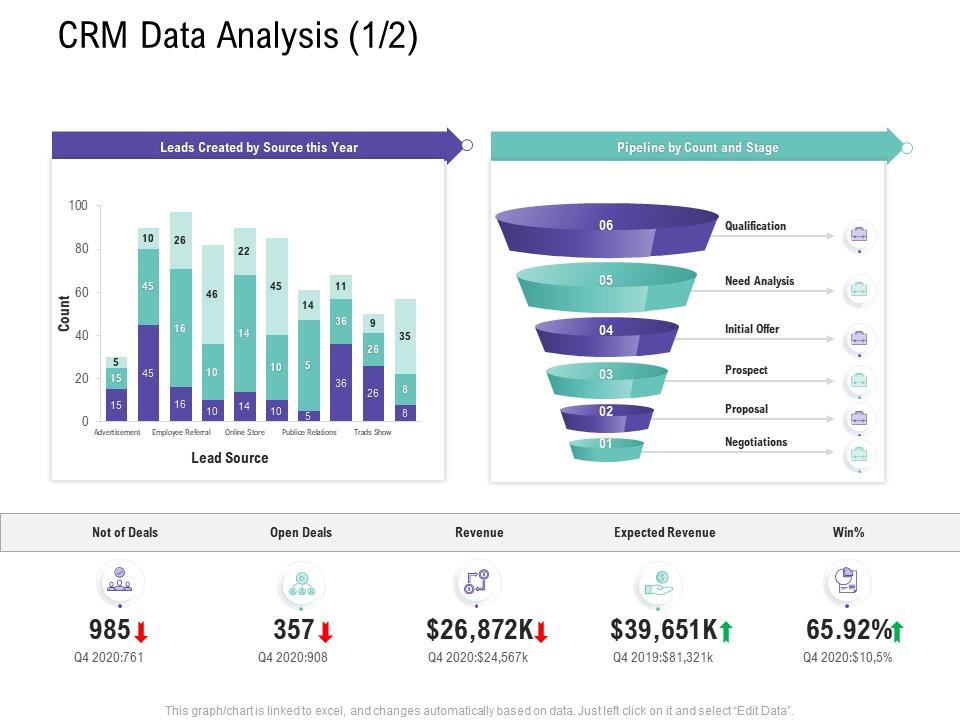
Credit: www.slideteam.net
Pricing And Affordability Of Crm Analytics Solutions
CRM analytics solutions offer insights to improve customer relationships and sales. Pricing varies widely based on features, usage, and vendor. Understanding pricing models helps businesses choose affordable options that fit their needs.
Cost and value must be balanced carefully. Businesses want to avoid overspending on complex tools or missing out on essential analytics features.
Common Pricing Models In Crm Analytics
CRM analytics pricing usually follows one or more of these models:
- Subscription-based: Pay monthly or yearly per user or seat.
- Tiered pricing: Different plans with increasing features and limits.
- Usage-based: Charges depend on data volume or analytics queries.
- One-time license: Single payment for perpetual software access.
Many vendors combine these models to suit various business sizes and requirements.
Cost Comparison: Dedicated Crm Analytics Vs. Basic Tools Like Excel
| Feature | Dedicated CRM Analytics | Basic Tools (e.g., Excel) |
|---|---|---|
| Price | Starts from $20 to $200+ per user/month | One-time purchase or subscription ($10-$30/month) |
| Data Integration | Automated, connects directly to CRM systems | Manual imports, limited automation |
| Analytics Capability | Advanced dashboards, predictive analytics, real-time data | Basic charts, formulas, and pivot tables |
| Ease of Use | User-friendly interfaces designed for CRM data | Requires spreadsheet skills and manual updates |
| Scalability | Handles large data sets and multiple users | Limited by file size and manual effort |
Dedicated CRM analytics provide deeper insights and save time. Excel suits small businesses or simple needs but lacks automation and advanced features.
Evaluating Roi And Value For Money
Return on investment (ROI) depends on improved decision-making and sales growth. Key factors include:
- Efficiency gains: Time saved on data processing and reporting.
- Accuracy: Reduced errors from manual data handling.
- Customer insights: Better targeting and personalized marketing.
- Sales impact: Higher conversion rates and customer retention.
Calculate ROI by comparing analytics costs with revenue growth and cost savings.
Heffl offers a balanced CRM analytics solution at affordable prices, ideal for small to mid-sized businesses. It combines project management with CRM data insights, improving productivity without high costs.
Pros And Cons Of Crm Data Analytics Based On Real-world Usage
CRM Data Analytics helps businesses understand customer behavior and improve decision-making. Users gain insights into sales trends, customer preferences, and marketing effectiveness. Real-world feedback shows clear advantages but also reveals some challenges.
Advantages Highlighted By Users
- Improved Customer Insights: Analytics reveal detailed customer patterns, enabling personalized marketing.
- Better Sales Forecasting: Data trends help predict sales and allocate resources efficiently.
- Enhanced Decision Making: Visual dashboards and reports simplify complex data interpretation.
- Increased Efficiency: Automation of data analysis reduces manual work and errors.
- Cross-Department Collaboration: Analytics support teamwork by sharing customer data across teams.
Challenges And Limitations
- Data Quality Issues: Inaccurate or incomplete data can lead to wrong conclusions.
- Complex Setup: Initial integration and configuration require technical skills and time.
- Cost Concerns: Advanced analytics tools can be expensive for small businesses.
- User Training Needs: Staff require training to use analytics effectively.
- Privacy and Security: Managing sensitive customer data requires strict compliance.
When Crm Analytics May Not Be The Best Fit
CRM analytics might not suit every business scenario:
- Small Customer Base: Limited data reduces the value of deep analytics.
- Simple Sales Processes: Businesses with straightforward workflows may not need complex analysis.
- Limited Budget: High costs of tools and training can outweigh benefits.
- Poor Data Management: Without clean and consistent data, analytics lose accuracy.
- Resistance to Change: Teams unwilling to adopt new tools may hinder success.
| Situation | Reason CRM Analytics May Not Fit |
|---|---|
| Small Business | Insufficient data volume for meaningful insights |
| Simple Sales | Processes too basic for advanced analytics |
| Budget Constraints | Costs of tools and training too high |
| Poor Data Quality | Inaccurate data leads to unreliable results |
| Team Resistance | Lack of adoption limits analytics effectiveness |
Credit: diawahad.medium.com
Excel As A Basic Crm: When And Why To Use It
Excel serves as a simple CRM tool for many small businesses and startups. It offers a familiar interface for tracking customer data without extra costs. Using Excel can be practical when dealing with a limited number of contacts and simple sales processes.
This approach works best early in business growth or for teams with basic CRM needs. Excel allows manual data entry, sorting, and basic analysis, giving users control over their customer information. Yet, its simplicity means it has clear limits as the business scales.
Benefits Of Using Excel For Small-scale Crm Needs
- Cost-effective: Excel is usually already available and free to use.
- Easy to customize: Users can create personalized sheets and columns.
- Simple data management: Organize contacts, track interactions, and follow up dates.
- Basic analysis tools: Use filters, pivot tables, and charts for insights.
- Low learning curve: Many users already know Excel basics.
Limitations And Risks Of Excel As A Crm Tool
Excel lacks automation and advanced CRM features. It cannot handle complex customer journeys or large data sets efficiently. Risks include data loss, errors, and version control problems when multiple users edit files.
| Limitations | Risks |
|---|---|
| No automated reminders or workflows | Human errors during manual data entry |
| Poor multi-user collaboration | Data inconsistency and duplication |
| Limited reporting and analytics | Security vulnerabilities and lack of backups |
Indicators It’s Time To Upgrade To Dedicated Crm Analytics
- Customer database grows beyond manageable size in Excel.
- Sales processes require automation and tracking.
- Need for detailed customer insights and reports increases.
- Team collaboration demands centralized data access.
- Data security and compliance become priorities.
At this point, tools like Heffl offer integrated CRM and project management features. They provide advanced analytics, better data control, and improved efficiency over Excel spreadsheets.
Recommendations For Ideal Users And Scenarios
CRM data analytics offers valuable insights for various business types and goals. Choosing the right tool depends on company size, industry, and analytics needs. This section guides ideal users and scenarios to maximize CRM analytics benefits.
Best Crm Analytics Solutions For Small To Medium Businesses
Small to medium businesses (SMBs) require user-friendly and cost-effective CRM analytics tools. These solutions focus on essential features without overwhelming complexity.
- Simple dashboards for quick sales and customer insights
- Integration with common tools like email and marketing platforms
- Easy setup and low learning curve for teams with limited tech skills
- Affordable pricing with scalable plans
Tools like Heffl combine CRM and project management, ideal for SMBs aiming to track customer data and manage workflows efficiently.
Enterprise-level Needs And Advanced Analytics Features
Large enterprises demand advanced analytics for deep data exploration and predictive insights. These tools handle vast customer data and complex workflows.
| Feature | Enterprise Benefit |
|---|---|
| Predictive Analytics | Forecast customer behavior and sales trends |
| Customizable Reports | Tailored insights for different departments |
| Data Integration | Combine multiple data sources for comprehensive analysis |
| Security & Compliance | Protect sensitive customer information |
Enterprise CRM analytics platforms often require dedicated IT support and training to fully leverage their capabilities.
Selecting The Right Crm Analytics Based On Industry And Goals
Industry-specific needs influence CRM analytics choice. Different sectors demand unique data insights and functionality.
- Retail: Focus on customer purchase patterns and inventory trends
- Healthcare: Prioritize patient data security and compliance
- Finance: Emphasize risk analysis and detailed reporting
- Manufacturing: Track supply chain and customer service metrics
Define your core goals before selecting a CRM analytics tool. Consider whether the focus is on improving sales, enhancing customer service, or optimizing marketing campaigns.
Heffl offers flexibility to adapt across industries with customizable project management and CRM functions.
Conclusion: Unlocking Customer Insights Fast With Crm Data Analytics
CRM Data Analytics helps businesses understand customers quickly. It turns raw data into clear insights. These insights support faster, smarter decisions. Using tools like Heffl can simplify this process. It combines CRM and project management in one platform. This makes analyzing customer data easy and effective.
Fast access to customer insights improves sales, marketing, and support. Teams can spot trends and act without delay. This leads to better customer experiences and higher satisfaction.
Summary Of Key Takeaways
- CRM analytics transforms data into actionable insights.
- It helps identify customer behavior and preferences fast.
- Tools like Heffl integrate CRM and project management features.
- Quick data analysis supports timely and informed business decisions.
- Using CRM data boosts customer retention and sales growth.
Future Trends In Crm Analytics
- AI and machine learning will enhance data analysis accuracy.
- Real-time analytics will become standard for quick response.
- Integration with multiple platforms will provide deeper insights.
- Predictive analytics will forecast customer needs and behaviors.
- More user-friendly dashboards will simplify data interpretation.
Steps To Get Started With Crm Data Analytics
- Choose a CRM tool that fits your business needs, like Heffl.
- Collect and organize customer data systematically.
- Set clear goals for what insights you want to gain.
- Use analytics features to explore customer patterns and trends.
- Train your team to interpret data and apply insights.
- Regularly review analytics results to improve strategies.

Credit: www.slideteam.net
Frequently Asked Questions
What Is Crm Data Analytics?
CRM data analytics examines customer data to help businesses improve decisions, sales, and customer relationships effectively.
What Are The 4 Types Of Crm?
The four types of CRM are operational, analytical, collaborative, and strategic. Each type focuses on different customer management aspects.
How Much Do Crm Analysts Make?
CRM analysts typically earn between $55,000 and $85,000 annually, depending on experience and location. Higher salaries occur in major cities and with advanced skills.
Is Excel A Crm Database?
No, Excel is not a dedicated CRM database. It works as a basic, manual CRM for small businesses but lacks automation, scalability, and advanced CRM features.
Conclusion
CRM data analytics helps businesses understand customer behavior clearly. It improves decision-making and boosts sales strategies effectively. Using tools like Heffl simplifies data analysis and project management together. Heffl combines CRM features with easy-to-use analytics in one platform. Explore how Heffl can support your business growth by visiting Heffl on AppSumo. Stay informed, act on insights, and build stronger customer relationships daily.